Standard Operating Procedures—SOPs—are the cornerstone of any structured business process. From manufacturing plants to healthcare providers, and from IT support teams to pharmaceutical companies, SOPs are considered a non-negotiable part of operations. They’re the documentation of how things should be done, which includes step-by-step instructions to reduce human error, maintain quality, and meet compliance standards.
But here’s the uncomfortable truth: your SOPs might be doing more harm than good.
If your employees are wasting hours looking for the right process, confused about outdated instructions, or skipping SOPs altogether because they’re too difficult to follow, then you’re not running a process-driven organization. You’re running a documentation museum. If you’ve ever suspected that your operations are being slowed down, not by lack of SOPs, but by the wrong kind of SOPs, then this is for you.
The SOP Irony: Built for Efficiency, Yet Breeding Inefficiency
The original intent behind SOPs was noble: to ensure consistent execution, faster onboarding, quality control, and regulatory compliance. Yet, in the real world, most SOPs today end up being ignored, outdated, or actively resisted by employees.
Why?
The traditional approach to SOPs, static documents written in Word or PDF, saved in random folders or SharePoint repositories, is fundamentally broken in a digital-first business environment.
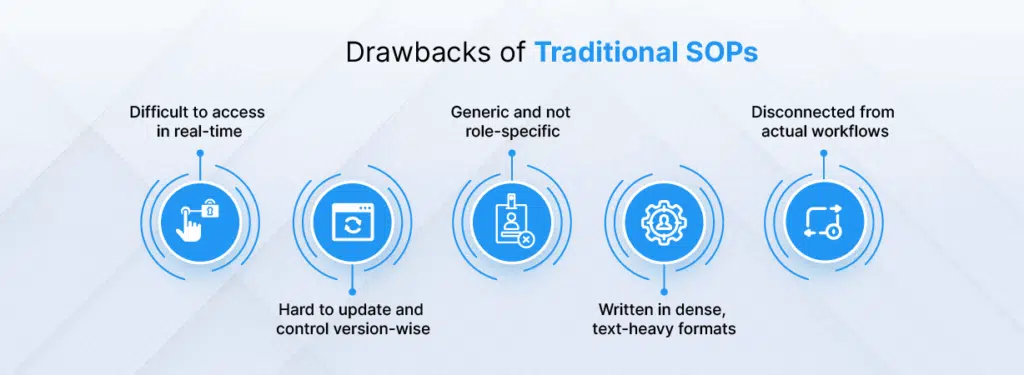
As a result, instead of streamlining work, SOPs often become a source of friction.
The Hidden Ways SOPs Are Hurting Your Business
Let’s break down how these legacy SOPs actually slow you down and in some cases, expose your business to serious risk.
- Wasting Time Through Poor Accessibility
In a modern business setting, time is currency. Yet, how often do your team members have to dig through email threads, network folders, or shared drives to locate the SOP they need?
Consider a field technician trying to find a safety procedure while on-site. A new hire hunting for the onboarding checklist. A finance associate trying to verify the latest approval protocol.
If your SOPs aren’t accessible in under 30 seconds, they’re useless in critical moments.
Time spent searching is time lost. Not just in the moment, but multiplied across teams, departments, and days.
- Following the Wrong Instructions
Business environments are dynamic. Processes evolve rapidly. New regulations are introduced. Tools change. Markets shift.
Yet, most SOPs are written once and left untouched for months or years. Without built-in triggers or alerts for updates, teams are often unknowingly following outdated processes. This leads to:
- Costly rework
- Non-compliance with new standards
- Customer dissatisfaction
- Inconsistent outputs
An SOP should be a living document. But in most organizations, it’s fossilized the moment it’s created.
- One Document, Too Many Roles
Imagine giving the same training manual to a factory worker, a supervisor, and a quality control engineer. It wouldn’t make sense. Yet that’s exactly what happens with static SOPs.
Legacy SOPs don’t adjust for roles, skill levels, or context. They dump everything into one document, expecting all users to extract what they need.
This overwhelms frontline staff. It confuses middle management. It irritates executives.
More importantly, it leads to selective reading, or worse, complete avoidance.
- Version Control Nightmares
In traditional SOP systems, it’s common for different teams to be working off different versions of the same procedure. One team has version 2.1 saved locally. Another is using 2.0 from a printout. A third assumes version 1.9 is still valid.
Without a centralized, real-time update mechanism, SOP versioning becomes a free-for-all.
This isn’t just inefficient. It’s dangerous. In regulated industries, using the wrong version of an SOP can be a compliance violation that results in fines, legal consequences, or even safety incidents.
- Weak Training and Knowledge Transfer
Most employees don’t learn effectively from 20-page documents filled with jargon and block text. Yet that’s what SOPs often are.
Whether you’re onboarding a new hire or cross-training an existing employee, relying solely on static documents is setting them up for failure.
Retention is low. Engagement is lower. And the likelihood of real-world execution matching the documented process? Very low.
The Business Cost of SOP Inefficiencies
While the immediate pain of bad SOPs is operational, delays, confusion, errors, the real damage is strategic.
Over time, inefficient SOPs erode:
- Productivity
Teams move slower. Deadlines slip. Resources are wasted fixing avoidable issues. What should take 10 minutes takes 30.
- Compliance
Audits fail. Logs are incomplete. Records can’t be traced. You’re no longer just inefficient; you’re exposed.
- Culture
When employees can’t trust the tools they’re given, they stop using them. They create workarounds. Tribal knowledge replaces documentation. SOPs become a joke, not a guide.
- Agility
In today’s markets, speed of adaptation is key. But static SOPs make process changes painful. Want to roll out a new approval flow? Update a client servicing step? It takes weeks, not days.
Why SOP Digitization Is the Only Way Forward
Digitization doesn’t mean scanning your printed SOPs and uploading them as PDFs. That’s just prettier paper.
SOP digitization means reimagining your entire approach to operational documentation. It’s about making SOPs:
- Accessible
- Interactive
- Role-specific
- Continuously updated
- Embedded into workflows
Digital SOPs Work Because They Are:
- Centralized and Searchable
Modern digital SOP platforms allow employees to search for any procedure with keywords, filters, or tags, just like Google. No more hunting through 20 folders to find a document.
- Always Updated
Version control is built-in. Admins can push changes in real-time and notify users immediately. Everyone works from the latest version always.
- Contextualized
Users only see the steps that matter to them. A warehouse staff member doesn’t need to wade through procurement steps. A manager sees approvals. A technician sees execution steps.
- Multimedia-Enabled
Instead of dense text, digital SOPs can embed:
- Walkthrough videos
- Clickable checklists
- Process maps
- Interactive forms
This improves comprehension, reduces training time, and boosts compliance.
- Actionable
SOPs no longer live outside your workflow. They are part of it.
Need to submit a form? It’s right there in the SOP. Need to mark a step as complete? Click and done. SOPs become dynamic, not passive.
The Organizational Payoff: What You Gain by Digitizing SOPs
Digitization isn’t just about operational improvement. It’s about strategic uplift.
- Faster Onboarding
New hires get structured, interactive SOPs tailored to their role. Time-to-productivity drops significantly.
- Better Compliance
With audit trails, update logs, user tracking, and e-signatures, you have all the data to prove adherence to protocols. No more scrambling during audits.
- Increased Efficiency
By eliminating time wasted on searching, verifying, or clarifying SOPs, teams can focus on execution. Every hour saved translates to more output, fewer errors, and better service.
- Data-Driven Improvements
Digital SOPs generate usage analytics. You can see which SOPs are most accessed, which steps are frequently skipped, and where users struggle. This allows you to continuously optimize your processes.
Addressing Common Objections
Many organizations hesitate to digitize SOPs due to perceived challenges. Let’s address them:
“We don’t have time to digitize everything.”
You don’t need to. Start with the 10–20 most-used SOPs. The benefits from even partial digitization are immediate. Expand incrementally.
“Our employees aren’t tech-savvy.”
Good digital SOP platforms are designed for ease-of-use. If your team can use a smartphone, they can use a digital SOP. Plus, training time drops dramatically.
“We already store SOPs in our Google Drive/SharePoint.”
Storage is not the same as systemization. Google Drive doesn’t offer workflows, access logs, multimedia support, or version control. You need more than a cloud folder.
The Future of SOPs: Integrated, Intelligent, Invisible
Imagine a world where:
- SOPs are suggested to employees based on the task at hand.
- Process gaps are flagged automatically when SOPs are skipped.
- Updates are made collaboratively and go live instantly.
- SOPs talk to your ERP, CRM, or HRMS to trigger actions.
This isn’t a dream. It’s the next logical step. As organizations embrace digital transformation, SOPs need to evolve from documentation to decision-making tools.
And if your SOPs aren’t helping your people do better work, then it’s time to ask: why do they exist?
The First Step Towards Productivity: Let SOPs Work for You
You already know SOPs are essential. The real question is are they effective?
If they’re slowing down your business, confusing your team, or failing to support innovation, then you’re due for a shift.
Digital SOPs can turn your operations from reactive to proactive, from error-prone to precise, and from outdated to agile.
You don’t need another static document. You need a dynamic solution.
That’s where ClykOps comes in.
ClykOps is an intelligent SOP automation platform built to eliminate the chaos of legacy processes. Whether you’re in pharma, banking, logistics, or manufacturing, ClykOps helps you create, manage, and track SOPs that empower your workforce, not frustrate them. With features like visual workflow builders, role-based access, compliance-ready logs, and seamless integrations, ClykOps transforms your SOPs from a burden into a business advantage.
Your SOPs shouldn’t kill productivity. Let ClykOps help you bring them back to life.